
The FIFA Agent Exam is a mandatory step for anyone who wants to obtain a FIFA Agent licence. This journey to register for the exam begins with creating an account on the FIFA Agent Platform.
What is FIFA Agent Platform?
The FIFA Agent Platform is FIFA’s official digital portal where you submit your application, follow your examination process, handle communication with FIFA and, once certified, manage your licence. For all aspiring FIFA agents, the FIFA Agent Portal is a mandatory gateway.
This article covers the step-by-step guide to the FIFA Football Agent licence application process on the FIFA Agent Platform.
Step-by-Step Guide on how to register on the FIFA Agent Exam Platform
Step 1: Create an Account
Go to the FIFA Agent Platform, accessible at https://agents.fifa.com/, and register as a new user. You will need to provide your personal information and identification documents to verify your identity and ensure a secure registration process.

Once your account is created, you will receive a confirmation email and gain access to the platform’s full range of sections, including the one dedicated to the exam itself.
Step 2: Confirm Your Licensing Pathway
On the platform, you will be asked to select how you are pursuing your licence. There are two routes. If you have not yet taken the FIFA Agent Exam, you must register to sit it. If you already hold certification from a national association, you submit that certification for validation instead.
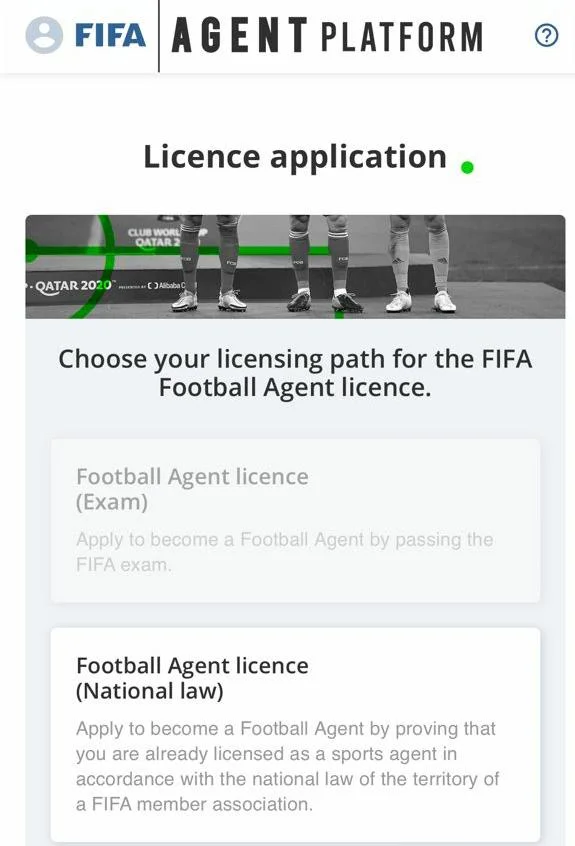
Most first-time applicants will be taking the exam route, and that is what the rest of this guide covers.
Step 3: Complete the Application Form
FIFA does not keep applications open year-round. Since 2025, FIFA has held one exam per year, with a 45-day application window. For the 2026 edition, that window opened on 20 January 2026 at 00:00 CET and closed on 6 March 2026 at 23:59 CET. If you are preparing for the 2027 FIFA Agent Exam, the application form will be available from January 2027.
During this window, you complete a form with your personal details and upload your supporting documents. Complete each section carefully to avoid delays in the processing of your application. Ensure the application is complete or consistent to avoid delay.
Any application submitted after the window closes will not be accepted, and you will have to wait until the 2028 cycle. Join our Aspiring Agents Group, where we provide daily updates about the FIFA Agent Platform and free resources to practise with.
Step 4: Submit and Track Your Application Status
Once submitted, your application enters a review process conducted independently by both FIFA and your relevant member association. Your licence application status will show as “Under Review”.

What “Under Review” Status of an agent licence application mean
If your FIFA Football Agent licence application status shows “Under Review”, it means FIFA and your member association are actively checking your application against the Article 5 eligibility requirements of the FFAR. You can read those requirements here. This process usually takes 14 to 21 days, and sometimes longer. It is normal for this stage to take time, and it does not mean something is wrong with your application. Check your registered email regularly, including your spam folder, as FIFA may request additional information during this period. Missing that request can cause further delays.
Step 5: Pay the Exam Fee and Select Your Session.
Once your application clears verification, you will receive instructions to pay the exam fee and choose an available exam session, including your preferred date, time, and language.
Step 6: Complete the Pre-Exam Readiness Check.
FIFA requires all candidates to complete a mandatory readiness check before a set deadline. This confirms that your laptop, internet connection, testing environment, and secondary device, typically a mobile phone used to record and share your screen during the exam, all meet the required standards. Failure to complete the readiness check means you will not be permitted to sit the exam. Every year, several candidates are unable to sit the exam due to technical issues, which will be covered in detail in a subsequent article.
Step 7: Take the Exam
Once the readiness check is complete, the next step is to sit the exam. The exam is conducted online on the same platform. It consists of a series of questions designed to test your knowledge of FIFA regulations, the transfer system, agent responsibilities, ethical requirements, safeguarding rules, and the protection of players and clubs. Our FIFA Agent Exam Preparatory Course breaks down the curriculum and includes over 21 hours of video content, 236 lessons, and one-on-one sessions to help aspiring agents pass the mandatory FIFA licensing exam.
Key Steps to Register for the FIFA Agent Exam on the FIFA Agent Platform.
| Phase | Description | Estimated Time |
1. Account Creation | Register as a new user on the FIFA Agent Platform and submit your personal information and identification documents. | 1 to 2 days |
| 2. Licence Application | Complete the application form and upload all required supporting documents within the 45 days application window. | 1 to 3 days |
| 3. Requirements Verification | FIFA and your relevant member association review your application against the Article 5 FFAR eligibility criteria | 14 to 21 days |
4. Pre-Readiness Check | Complete the mandatory technical readiness check to confirm your device, internet connection, and testing environment meet FIFA’s requirements. | 14 to 21 days |
5. Exam Session | Sit the FIFA Agent Exam online, covering the 8 FIFA Regulations, Safeguarding of minors and ethical requirements. | 60-minute |
Answers to Frequently Asked Questions About the FIFA Football Agent Licence Application
Q: What does “Under Review” mean on the FIFA Agent Platform?
A: “Under review” means your licence application is being assessed by both FIFA and your relevant member association against the Article 5 eligibility requirements of the FFAR. This stage usually takes 14 to 21 days and is a normal part of the process.
Q: Can you register after the FIFA agent license application window closes?
A: No. FIFA does not accept late registrations once the 45-day application window has closed, regardless of the circumstances.
Q: What documents are required for FIFA Agent Platform registration?
A: You will need to submit identification and supporting documents proving your identity and eligibility, in the format and quality specified by FIFA.
Q: Is the Pre-Exam Readiness Check mandatory?
A: Yes. Failure to complete the Pre-Exam Readiness Check means you will not be allowed to write the exam.
If you have any questions or need clarification, do not hesitate to reach out:
Email: support@theballbusiness.com
WhatsApp: +44 114 352 3064
